Guide
The Ultimate Website Launch Checklist for Small Businesses
Every check that matters before, during, and after your site goes live — so launch day is a switch you flip, not a fire you fight.
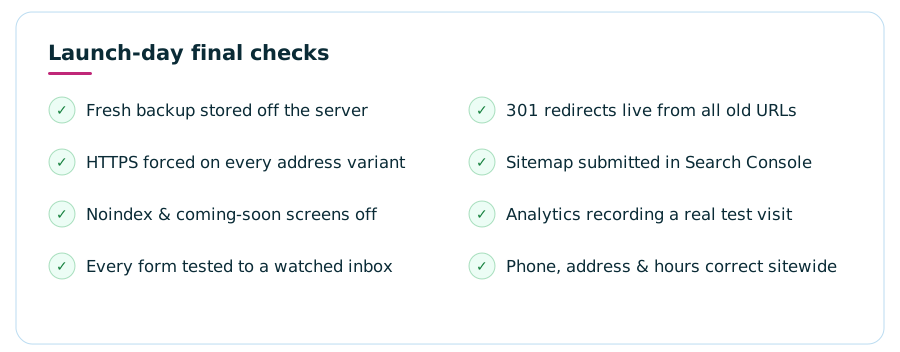
A website launch checklist covers three phases. Before launch: proofread every page, test all forms and links, confirm mobile layouts, set unique page titles, map 301 redirects from any old site, and take a full backup. On launch day: turn off “noindex,” force HTTPS, submit your sitemap to Google Search Console, verify analytics, and test the site as a real customer. After launch: monitor forms, crawl errors, and speed for the first month, then move into a regular maintenance routine. Work the list in order — the most expensive launch mistakes are the invisible ones.
Why do website launches go wrong?
Almost never because of the things owners worry about. The homepage photo you agonized over won’t sink the launch. What sinks launches is the quiet stuff: a contact form that looks fine but delivers to an inbox nobody checks, a “discourage search engines” toggle left on from the staging site, old URLs that now dead-end in error pages, a phone number that’s right on the homepage and wrong in the footer.
None of these announce themselves. A broken form doesn’t ring an alarm — it just silently loses every enquiry until someone mentions, weeks later, that they “tried to reach you through the site.” That’s why a written checklist beats a careful person every time: the failures are exactly the items nobody thinks to look at. This guide is the full list, phase by phase. Use it whether you built the site yourself, hired a freelancer, or are double-checking an agency’s work before you sign off.

Phase 1: The pre-launch checklist
Everything in this phase happens while the site is still private — on a staging link or a temporary domain. The rule is simple: nothing on this list should be “we’ll fix it after launch.” After launch you’ll be busy, and live visitors will meet every flaw first.
Content and copy
- Every page proofread out loud. Reading aloud catches the missing words and duplicated sentences your eyes skip on screen. Do it page by page, not “one big skim.”
- No placeholder anything. Search the site for “lorem,” “TBD,” “XXX,” and your web designer’s stock phrases. Placeholder text has a genius for hiding on the pages you check least.
- Contact details verified character by character. Phone number, email, address, hours — checked everywhere they appear: header, footer, contact page, and any embedded map. Call the number on the page yourself.
- One clear call to action per page. Every page should answer “what do I want the visitor to do next?” If a page has no answer, it needs one before launch.
- Real images with real alt text. Every image has a descriptive alt attribute — it’s how screen-reader users experience your photos and one of the simplest accessibility wins available.
- Legal pages in place. A privacy policy at minimum — required by most ad platforms and expected by customers — plus terms if you sell online.
Design and experience
- Tested on a real phone, not just a resized browser. Tap every menu item, fill the form with your thumbs, rotate the screen. Most of your visitors will only ever see this version of your site.
- Navigation works everywhere. Every menu link goes where it says, the logo links home, and nothing in the nav points at a page that no longer exists.
- Buttons and links look tappable. Links are visibly distinct from body text, buttons are big enough for a thumb, and nothing important hides in a hover state that phones can’t trigger.
- A branded 404 page exists. Someone will eventually hit a dead URL. A helpful not-found page with a link back home keeps them; the server default loses them.
- Favicon and social preview set. The little browser-tab icon, plus the image and text that appear when your site is shared in a text message or on social media. Forgotten constantly, noticed immediately.
Technical foundations
- SSL certificate installed and forced. Every version of your address — with and without “www,” with plain http — must land on the single secure https version. Browsers flag anything less as “not secure.”
- Every form tested end to end. Not “the form loads” — submit each one and confirm the message arrives in an inbox a human actually monitors. Then check the spam folder, because that’s where new-site form mail loves to land.
- Full backup taken and stored off the server. If launch day goes sideways, this is the undo button. A backup that lives only on the same server as the site is not a backup.
- Load speed sanity-checked. Oversized images are the usual culprit on new sites. If pages feel slow on a phone connection, fix it now — our guide to making your website load faster covers the usual suspects.
- Broken-link crawl completed. A free crawler (or your SEO plugin) can walk every internal link in minutes and list the dead ends. Fix them all — visitors and search engines both hate them.
SEO before the switch
- Unique title and meta description on every page. Each page’s title should say what the page is and who it’s for — not “Home” times ten.
- One H1 per page, headings in order. The page title is the H1; sections are H2s; subsections H3s. Search engines and screen readers both read the outline.
- Redirect map written — if an old site exists. List every old URL and its new destination, and set a 301 redirect for each. This is the single highest-stakes item on the whole checklist for an established business: it’s how your existing rankings and backlinks transfer instead of evaporating.
- XML sitemap generated. Most platforms and SEO plugins produce one automatically — know its address, because you’ll submit it on launch day.
- Domain decided, once and forever. If you’re still choosing, settle it before launch — changing later means redoing redirects and citations. Our guide to choosing a domain name walks through it.
Extra checks if you sell online
An online store adds a layer to every phase, because a broken checkout costs money by the hour. Before launch, place a full test order with a real card in the payment provider’s test mode, confirm the order confirmation email arrives and reads correctly, and check that shipping rates and tax settings match what you actually charge. Verify your product pages show accurate stock, your refund policy page exists and is linked from the footer, and the checkout works on a phone — where most abandoned carts are born. On launch day, place one small live order and refund it: it’s the only test that exercises the entire pipeline, from product page to payment processor to confirmation email to your order dashboard.
Don’t forget email deliverability
If your email moves to a new host along with the site — or your forms send from a new domain — deliverability needs its own check. Confirm the domain’s sending records (SPF, DKIM, and DMARC — your host or email provider sets these) are in place, then send test messages to a Gmail address, an Outlook address, and your own inbox. Mail from freshly configured domains lands in spam more often than anywhere else, and a form that “works” but delivers to junk folders is functionally broken. This one check quietly prevents the most common silent failure of the entire first month.
Phase 2: Launch day, hour by hour
Launch day itself is short if Phase 1 was honest. Pick a quiet day — mid-week morning beats Friday afternoon, because you want business hours ahead of you if something needs fixing, not a weekend. Then work this sequence:
Take one final backup
Of the old site if one exists, and of the new site as it stands. Whatever happens next, you can get back to this moment.
Point the domain and force HTTPS
Update DNS to the new site, then confirm every address variant redirects to the single secure version. DNS changes can take a few hours to reach everyone — that’s normal.
Flip the visibility switches
Turn off “discourage search engines” or any noindex setting left over from staging, and remove any password protection or “coming soon” screen.
Tell Google
Verify the site in Google Search Console, submit the XML sitemap, and request indexing of the homepage. Update the website link on your Google Business Profile and social profiles while you’re at it.
Test as a stranger
On a phone, off your own wi-fi: find the site, read a page, submit the form, and confirm the enquiry arrives. If you sell online, place a small real order and refund it.
Phase 3: The first week after launch
The site is live, but you’re not done — you’ve moved from building to watching. The first week is when the problems your checklist couldn’t catch reveal themselves, because real visitors do things testers never do.
Check form deliveries daily
Every day for the first week, confirm enquiries are arriving — and check spam. Email deliverability from a brand-new domain setup is the most common silent post-launch failure.
Watch Search Console for errors
Crawl errors and unexpected 404s show up here first. Each 404 with real traffic behind it is a redirect you missed — add it the day you spot it.
Confirm analytics is honest
Visits should be recording, and your own devices should be excluded so you’re not celebrating your own refreshes. If the numbers look like zero, tracking is broken — not your marketing.
Recruit fresh eyes
Ask three people who’ve never seen the site to find one specific thing — your hours, a price list, the booking form. Where they hesitate is your next fix.
The first month, and what “done” actually means
By the end of month one, the launch checklist hands off to a maintenance rhythm. Rankings for a new or rebuilt site take months to settle, so don’t judge SEO in week two — judge whether the foundations are holding:
- Indexing confirmed. Search your business name plus your city; your site should appear. In Search Console, your key pages should show as indexed.
- Redirects still holding. Spot-check the old URLs that mattered most — they should still land cleanly on the right new pages.
- Software updates applied. The first plugin and platform updates will already be waiting. Applying them promptly (after a backup) is the habit that keeps small sites from getting hacked.
- Content telling the truth. Anything that changed since launch — hours, staff, services, prices — updated on the site the week it changed, not “eventually.”
- A recurring maintenance slot booked. Monthly at minimum: updates, backup check, form test, quick click-through. Unowned maintenance is unmaintained.
A launch is “done” when the site is live, findable, measurable, and someone owns keeping it that way. If you’re not sure the site you’re about to launch has the right pieces in the first place, run it against our list of must-have website features before you flip the switch — and steer around the classic website mistakes while everything is still easy to change.
Who should own the launch checklist?
If you built the site yourself, you own it — block out a real day, work the phases in order, and don’t launch tired. If a freelancer or agency built it, the list changes jobs: it becomes your acceptance test. Before you approve the final invoice, walk the pre-launch section together and ask to see the redirect map, the backup, and a test enquiry arriving in your inbox. A good builder will have done all of it; a great one will show you without being asked.
And if the launch keeps slipping because the checklist feels endless next to running your actual business, that’s a legitimate reason to hand the whole thing off.
FAQWebsite launch checklist — common questions
What should I check before launching my website?
Before launch, verify five areas: content (every page proofread, real contact details, no placeholder text), design (mobile layout, working navigation, consistent branding), technical (SSL, backups, forms tested, 404 page), SEO (unique titles and descriptions, redirects mapped, sitemap ready), and legal (privacy policy and accessibility basics). Work through each area as a written checklist rather than from memory — the items you skip are always the ones that break.
How long does a website launch take?
The launch itself — pointing the domain, flipping the site live, and running final checks — usually takes a few hours, plus up to a day or two for DNS changes to reach everyone. The pre-launch checklist work is the real time cost: budget at least a full working day to test content, forms, redirects, and mobile layouts properly before you push anything live.
Do I need to redirect my old website pages to the new site?
Yes, if an old site exists. Every old URL that has traffic, backlinks, or search rankings needs a 301 redirect to its closest new equivalent. Skip this and visitors from Google, bookmarks, and other websites land on error pages — and the search rankings your old pages earned can fall away instead of transferring to the new site.
How do I tell Google my new website is live?
First confirm the site isn’t blocking search engines (the “discourage search engines” or noindex setting must be off). Then verify the site in Google Search Console, submit your XML sitemap, and use the URL inspection tool to request indexing of your homepage. If your business serves local customers, update the website link on your Google Business Profile the same day.
What should I do in the first week after launching a website?
Watch, test, and fix. Check daily that forms are delivering, monitor Search Console for crawl errors and unexpected 404s, confirm analytics is recording visits, and click through the site on a real phone. Ask a few customers to try finding something specific — fresh eyes surface problems the builder can’t see. Small fixes shipped in week one prevent most long-term issues.
What ongoing maintenance does a website need after launch?
A live site needs software and security updates, regular off-site backups, uptime monitoring, form testing, and periodic content updates to stay accurate. Launch is the start of that routine, not the end of the project. You can handle it yourself with a recurring calendar reminder, or bundle it into a managed plan so updates, security, and edits are done for you.