Guide
How to Get Customers From Your Website
A website that only sits there is a brochure. Here are the seven things that turn it into a machine that brings in calls, bookings, and paying customers — no jargon, no gimmicks.
To get customers from your website, do seven things: say what you do and where you do it the instant the page loads, give visitors one obvious action to take, show proof that real people trust you, build the local SEO basics so nearby customers actually find you, keep your forms short, make the site fast on a phone, and track which pages and channels produce enquiries so you can double down on what works. Most business sites fail on two or three of these — fixing them is usually worth more than any redesign.
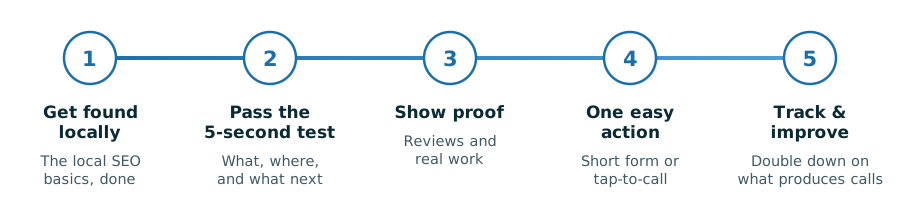
1. Pass the five-second test above the fold
Before a visitor scrolls, your homepage has to answer three questions: What do you do? Where do you do it? What should I do next? If a stranger can’t answer all three in five seconds, they hit the back button and call the next result. That’s the whole test.
- Lead with the plain version. “Plumbing repairs in Mesa, AZ” beats “Solutions for your home’s comfort” every single time. Clever headlines cost you customers; clear ones earn them.
- Put the city in the headline or right under it. Local customers are checking whether you serve them before anything else.
- Make the phone number visible without scrolling — on mobile, make it a tap-to-call link.
If your current homepage opens with a slideshow, a welcome paragraph, or your founding story, that’s the first thing to fix.

2. Give every page one primary action
A page with six competing buttons converts worse than a page with one. Decide the single thing you want a visitor to do — call, book, request a quote — and make that the loudest element on every page. Everything else is secondary.
- One button, repeated. The same call-to-action near the top, after the proof, and at the bottom. Visitors act when they’re ready; the button should be there when they are.
- Verb-first labels. “Book an Appointment” and “Get a Free Quote” outperform “Submit” and “Learn More” because they tell people exactly what happens next.
- Match the action to the intent. An emergency service wants tap-to-call; a consultative business wants a short request form. Don’t force a form on someone who needs you today.
3. Show proof before you ask for the sale
Nobody hires a stranger from the internet without checking whether other people already did. Trust signals aren’t decoration — they’re the answer to the question every visitor is silently asking: “Is this business legit?”
- Real reviews, shown on the site. Fresh Google reviews displayed on your pages do more persuading than any paragraph you could write about yourself.
- Photos of real work and real people. A genuine job-site photo or team picture beats a stock image of smiling models — visitors can tell the difference instantly.
- Specifics over slogans. Years in business, licenses, service areas, and named affiliations are checkable facts. “Committed to excellence” is not.
4. Get found: the local SEO basics
The best-converting page on earth produces nothing if nobody lands on it. For a local business, being found starts with fundamentals, not tricks — and it compounds over months, not days.
- A page for each core service, written in the words customers actually search — “water heater replacement,” not “residential solutions.”
- Your city and service area in titles and copy, plus consistent name, address, and phone details everywhere they appear online.
- A complete, active Google Business Profile that links to your site and collects those reviews from point 3.
- Answer real questions on your pages. Search engines and AI assistants increasingly surface pages that answer plainly — another reason clarity wins.
This is its own discipline, and no honest provider promises rankings on a schedule.
5. Build forms that don’t scare people off
Every extra field in a contact form costs you enquiries. The form’s job is to start a conversation, not to complete your intake paperwork — you can collect the details on the phone.
- Ask for three things: name, phone or email, and a message box. That’s enough to respond.
- Say what happens next. A short line beside the button about when you’ll get back to people removes the fear of the void.
- Confirm the send. A clear thank-you message reassures people it worked — and it’s the page where conversion tracking fires (see point 7).
- Test it monthly. A silently broken form is the most expensive bug a business site can have, and it’s alarmingly common.
6. Speed is a conversion feature
Most of your visitors are on a phone, often on a spotty connection, and their patience is measured in seconds. A slow site loses customers before it gets the chance to persuade them — they simply leave and tap the next result. Slow pages also tend to fare worse in search, so sluggishness costs you twice.
The usual culprits are oversized photos, bloated themes, plugin pile-ups, and bargain hosting. The fix is unglamorous: compressed images, a lean build, and decent hosting — checked regularly rather than once at launch.
7. Track what works, then do more of it
If you don’t know which pages and channels produce enquiries, you’re guessing — and probably spending time or money on the wrong things. The good news: basic tracking answers most questions.
- Count enquiries, not visits. Track form submissions and phone taps. Traffic that never contacts you is trivia.
- Know the source. Analytics will show whether enquiries come from search, maps, referrals, or ads — so you invest where customers actually come from.
- Review monthly, adjust quarterly. If one service page brings most of the leads, build more pages like it.
Once the site converts and the numbers prove it, paid traffic stops being a gamble — you know what a visitor is worth before you buy one. That’s when advertising becomes an amplifier instead of a money pit.
Frequently Asked Questions
Why is my website not getting me any customers?
Usually one of three reasons: nobody finds it (a search visibility problem), people find it but leave (a clarity or trust problem), or people want to act but the path is broken (a slow site, a long form, or no obvious button). Walk through the seven points in this guide in order — the first failure you hit is typically the one costing you the most.
What should be above the fold on a small business website?
Three things: a plain statement of what you do and the area you serve, one primary call-to-action button, and a visible phone number (tap-to-call on mobile). A trust element — review stars or a credential — earns its place there too. Slideshows, welcome messages, and long introductions push all of that out of view and cost you customers.
How many fields should a contact form have?
Three: name, phone or email, and a message. Every additional required field lowers the number of people who finish the form. Gather the rest of the details in the follow-up call — the form’s only job is to start the conversation.
How long does local SEO take to bring in customers?
Months, not days — local SEO compounds as your pages, reviews, and Google Business Profile build authority together, and anyone promising a specific ranking on a specific date should be treated with suspicion. The work is worth it because the results persist, unlike ads that stop the day you stop paying.
Do I need to run ads to get customers from my website?
No — clarity, trust, and local search visibility generate customers on their own. Ads are an amplifier: they multiply what your site already does, which is also why sending paid traffic to a page that doesn’t convert just burns budget faster. Fix the site first, prove it converts, then consider advertising to scale it.