Guide
The Ultimate Website Redesign Checklist
When it’s time to redesign, how to prepare, and the exact steps — audit, redirects, content migration, and relaunch QA — that keep your traffic and rankings intact through the switch.
A safe website redesign follows four phases: audit the current site (crawl every URL, note what earns traffic and links), map redirects (a one-to-one 301 from every old URL to its new home), migrate content (carry over titles, meta descriptions, headings, and internal links — not just the words), and QA the relaunch (test redirects, forms, mobile, and speed, then resubmit your sitemap). Sites lose rankings after a redesign when URLs change without redirects or optimized content gets rewritten blindly — both are preventable with the checklist below.
Do you actually need a redesign? Read this first
A redesign is surgery, not a haircut. Done for the right reasons it pays for itself; done out of boredom it risks traffic you spent years earning. These are the signals that genuinely justify one:
- The site embarrasses you in front of customers. You hesitate to put the URL on a business card. Visitors judge the business by it, and not kindly.
- It fails on phones. Pinch-zooming, buttons too small to tap, text that spills off screen. Most local searches happen on a phone — a desktop-only site is invisible where buying decisions get made.
- It’s slow and can’t be fixed in place. If the theme, page builder, or plugin stack is the bottleneck, no amount of tuning saves it. (If it can be fixed in place, start with our guide to making your website load faster before committing to a rebuild.)
- You can’t edit it. Changing a phone number requires a developer, an invoice, and a week of waiting. A site you can’t update quietly goes stale.
- The business outgrew it. New services, new locations, or a shift in who you serve — and the site still describes the company you were three years ago.
- It doesn’t convert. Traffic arrives but calls and form fills don’t. Weak calls to action, buried contact info, and no proof elements are structural problems, not copy tweaks.
And the counter-signals: if the site is merely dated-looking but ranks well, loads fast, and converts, a visual refresh on the existing structure is cheaper and far less risky than a rebuild. If it just needs upkeep, a maintenance plan solves that for a fraction of the cost. Redesign when the foundation is the problem — not the paint.

Audit the current site before anyone touches a pixel
The single biggest redesign mistake is treating the old site as worthless. It isn’t — it holds data about what already works, and that data disappears the day the new site goes live. Capture it first:
1
Crawl every URL
Export a full list of the site’s pages — a crawler, your CMS page list, and your XML sitemap combined. This inventory becomes the left column of your redirect map. Pages you forget here are the ones that 404 later.
2
Flag what earns traffic
In Google Analytics and Search Console, note which pages bring in organic visitors and which queries they rank for. These pages are assets. They get preserved, redirected carefully, and improved — never casually deleted.
3
Find your backlinks
Other sites linking to yours pass authority to specific URLs. If those URLs die without a redirect, the authority dies with them. List the pages other sites link to so every one of them has a forwarding address.
4
Benchmark everything
Screenshot your rankings, record monthly organic traffic, load times, and conversion counts. Without a before picture, you can’t tell whether the redesign helped, hurt, or did nothing — and you can’t catch a drop early.
While you’re in there, take a full backup of the old site — files, database, and images. If anything goes sideways at launch, the ability to roll back turns a crisis into an inconvenience.
Phase 2Map your URLs and set up 301 redirects
This is the phase that decides whether your rankings survive. Search engines rank URLs, not websites. When a redesign changes an address — even slightly, like /services.html becoming /services/ — Google treats the new page as a stranger unless a 301 redirect tells it otherwise. A 301 is a permanent forwarding notice: it sends visitors to the new page and passes along the ranking equity the old URL earned.
Build the redirect map
A two-column spreadsheet: every old URL on the left, its exact new destination on the right. Work from the Phase 1 crawl so nothing is missed. This document is the redesign’s insurance policy.
Redirect one-to-one, not to the homepage
Every old page points to the new page that serves the same intent. Dumping everything to the homepage is a “soft 404” in Google’s eyes — the equity you’re trying to save mostly evaporates.
Keep URLs that already work
The safest redirect is the one you never need. If a page ranks and its URL is sensible, keep the address identical and redesign around it. Change URLs only when the structure genuinely improves.
Avoid redirect chains
If the last redesign left redirects behind, point the oldest URLs straight at the final destination — not old → older → new. Chains slow visitors down and leak equity at every hop.
Decide what dies deliberately
Thin, outdated pages with no traffic and no links can be retired without a redirect — but that should be a decision recorded in the map, never an accident discovered in a 404 report.
Implement the redirects so they’re live the moment the new site is — server-level or via a redirect plugin, tested on the staging copy before launch day.
Phase 3Migrate the content, not just the words
A page that ranks is more than its paragraphs. The title tag, the meta description, the heading structure, the image alt text, and the internal links pointing at it all contribute — and a redesign quietly resets any of them you don’t deliberately carry over.
Titles and meta descriptions
These took effort to get right and Google already trusts them. Copy them into the new build field by field. A fresh theme that regenerates “Home – Company Name” titles undoes years of optimization in one click.
Heading structure
One H1 per page stating what the page is about, H2s for major sections, H3s beneath them. Designers sometimes pick heading levels for font size — make the outline logical first, then style it.
Internal links
The links between your own pages tell search engines which pages matter most. Rebuild them on the new site pointing at the new URLs directly, so your own navigation isn’t routed through redirects.
Images and alt text
Re-compress images for the new design rather than reusing heavy originals, and carry over (or finally write) descriptive alt text. It’s an accessibility requirement and an extra relevance signal in one.
Improving copy during a redesign is fine — encouraged, even. The rule is to improve on purpose: know which phrases a page ranks for before rewriting it, and keep the topic and depth intact while you sharpen the message. Rewriting a ranking page from scratch without looking is how “the new site is prettier but the phone stopped ringing” happens.
Phase 4Relaunch QA: the checks that catch expensive mistakes
Launch day problems are almost never exotic — they’re the same handful of oversights, and every one takes minutes to check. Run this list on the staging site the day before launch, and again on the live site within an hour of flipping the switch:
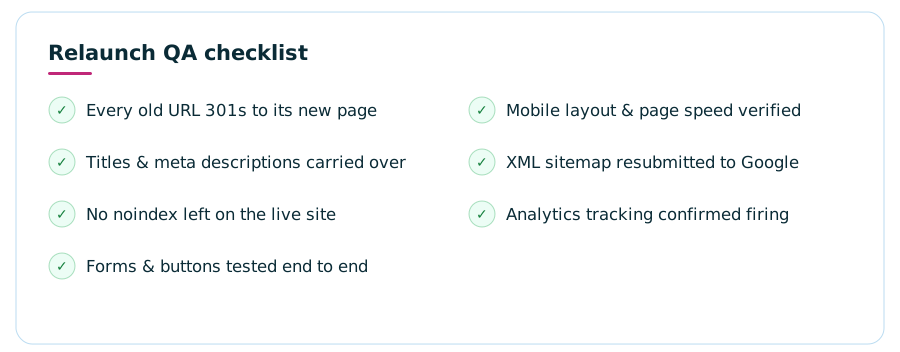
Two of these deserve extra emphasis. First, the noindex trap: staging sites are (correctly) hidden from search engines with a noindex setting or a discouraged-crawling checkbox, and forgetting to remove it at launch silently removes your entire site from Google — often unnoticed for weeks. Second, redirect spot-checks: don’t just trust the plugin screen. Paste ten of your old URLs — especially the traffic earners from Phase 1 — into a browser and confirm each lands exactly where the map says it should.
Beyond the seven headline checks: click through every page looking for broken images and placeholder text, confirm the SSL certificate covers the site, verify the 404 page is helpful rather than a dead end, and make sure phone numbers are tap-to-call links on mobile.
Where redesigns actually go wrong
Almost every post-redesign traffic drop traces back to one of a small set of process failures — and every one of them is a planning problem, not a design problem:
SEO invited too late
The redirect map and content plan get bolted on the week before launch, after the new page structure is already locked. The migration phases in this checklist belong at the start of the project, shaping decisions — not auditing them after the fact.
Scope decided by looks
Pages get cut because they don’t fit the new design, not because the data says they’re expendable. A plain-looking page quietly ranking for a money keyword is worth more than a gorgeous one nobody finds.
Nobody owns the follow-through
The designer’s job ends at launch, the owner assumes someone is watching, and the first missed redirect surfaces months later as a mystery revenue dip. Name the person who monitors the first 30 days before the project starts.
After launch: watch the first 30 days like a hawk
A redesign isn’t finished at launch — it’s finished when the data says the site came through intact. Google typically takes days to weeks to recrawl a site and reconcile the new URLs, so a modest, temporary wobble in impressions is normal. What you’re watching for is the difference between a wobble and a wound:
- Search Console, twice a week. The Coverage and Pages reports surface crawl errors and unexpected 404s — each 404 with real traffic is a redirect you missed and can still fix.
- Compare against your Phase 1 benchmark. Organic traffic within a normal range of the old baseline after a few weeks means the migration held. A sustained drop on specific pages points you straight at the URLs to investigate.
- Watch conversions, not just visits. The redesign’s actual job was more calls and form fills. If traffic held but conversions fell, the issue is on-page — button placement, form length, message clarity — and it’s fixable.
- Fix fast. Redirect gaps found in week one cost little. The same gaps found in month six have already cost rankings that take far longer to rebuild.
One more calibration: local-business SEO recovers and compounds over months, not days. Distrust anyone who promises your rankings will jump the week after relaunch — and equally, don’t panic-rebuild in week two. Let the data settle, then act on it. Budgeting for the project instead? Our companion guide to website redesign cost covers what drives the cost and why quotes vary so wildly.
FAQWebsite redesign checklist — common questions
Will redesigning my website hurt my SEO?
Only if the migration is careless. Rankings drop after redesigns when URLs change without one-to-one 301 redirects, optimized titles and content get replaced blindly, or a noindex setting is left on at launch. Follow the audit, redirect-mapping, content-migration, and QA phases in this checklist and a redesign is far more likely to improve rankings than to harm them.
How long does a website redesign take?
It scales with the size of the site and how quickly content decisions get made. A small business site is typically a few weeks from kickoff to launch; large sites with many pages, custom features, or slow approvals stretch to months. The SEO-protection work in this checklist adds little time on its own — most of it is spreadsheet discipline, not development.
What is a 301 redirect and why does it matter in a redesign?
A 301 is a permanent forwarding instruction: anyone visiting an old URL — humans and search engines alike — is sent to the new one automatically. It matters because Google ranks URLs, and a 301 passes the earned authority of the old address to its replacement. Without it, changed URLs 404, the old rankings decay, and links from other websites point at dead pages.
Should I redesign my website or start over from scratch?
It matters less than people think, because either way the SEO process is the same: audit what earns traffic, keep or redirect every URL, and migrate the optimized content deliberately. Rebuild on a new platform when the current one is the problem; keep the platform and rework design and structure when it isn’t. The dangerous option is the casual one — changing everything with no map.
How often should a website be redesigned?
There’s no fixed schedule. Redesign when the site fails a real test — it’s broken on phones, too slow to fix in place, impossible for you to edit, or no longer describes the business — not because a birthday came up. A well-built, well-maintained site can run for years with incremental updates; ongoing maintenance stretches the time between rebuilds considerably.
What should I check right after launching a redesigned website?
Within the first hour: spot-check your most important old URLs to confirm the 301 redirects fire, make sure the noindex setting from staging is gone, test every form end to end, resubmit the XML sitemap in Google Search Console, and confirm analytics is recording. Then monitor Search Console for crawl errors and 404s over the following weeks and patch any gaps quickly.