Guide
Google Business Profile Optimization: The Complete Walkthrough
Setting up your profile got you on the map. Optimizing it is what gets you chosen . Here’s the full walkthrough — categories, photos, posts, Q&A, and reviews — in the order that actually moves the needle.
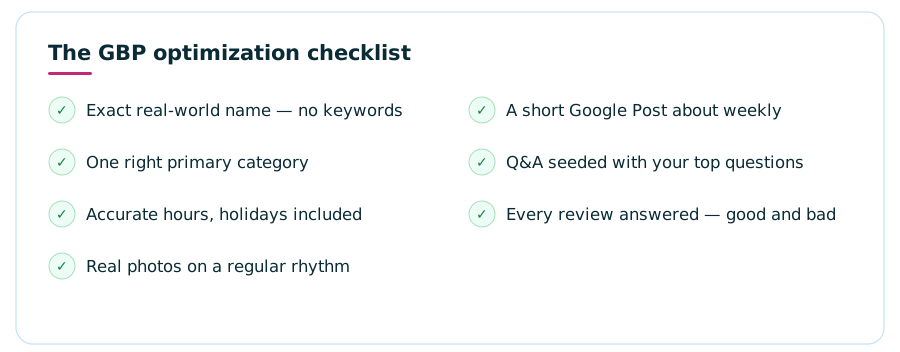
To optimize a Google Business Profile, work through five areas in order: lock down the foundations (your exact business name, the one right primary category, accurate hours), load it with real photos on a steady rhythm, publish short weekly Google Posts, seed the Q&A section with the questions customers actually ask, and build a consistent stream of reviews that you respond to every single time. Google ranks local results by relevance, distance, and prominence — you can’t change your address, but every one of the other levers is yours to pull. Expect results over months, not days.
Why BotherSetup gets you listed. Optimization gets you picked.
Most local businesses stop at verification: the pin is on the map, the phone number is right, done. But when someone searches “plumber near me,” Google isn’t choosing between listed and unlisted businesses — it’s choosing between dozens of verified profiles, and it picks three for the map pack.
Google is open about how it makes that choice. Its own guidance names three factors: relevance (how well your profile matches what was searched), distance (how close you are to the searcher), and prominence (how well-known and well-reviewed your business is, online and off). You can’t move your shop closer to every searcher — but relevance and prominence are built almost entirely from the things this guide covers.
There’s a second, quieter payoff. Even when you do appear, an optimized profile converts better: a searcher comparing three map-pack results will tap the one with current photos, answered questions, recent posts, and a thoughtful reply under its latest review. Optimization isn’t just about ranking — it’s about winning the tap once you’re on screen. If you haven’t created your profile yet, start with our plain-English intro to Google Business Profiles, then come back here.

Foundations: name, categories, and hours
Before photos and posts, get the boring fields exactly right — because two of them quietly control everything else.
1
Your name, exactly
Use your real-world business name — the one on your sign and invoices — and nothing more. Stuffing keywords into the name field (“Joe’s Plumbing | Best Emergency Plumber”) violates Google’s guidelines and is a common reason profiles get suspended or edited back. It also needs to match your website and directory listings, because consistency is part of how Google trusts you’re real.
2
The one right primary category
Your primary category is the strongest single signal you control. It decides which searches you’re eligible for at all. Pick the most specific option that describes your core business — “Family law attorney,” not “Lawyer,” if family law is what you do. Then add secondary categories for genuine services only. Every category you add dilutes the primary a little, so tight beats broad.
3
Hours people can trust
“Open now” is a live filter in local search — wrong hours mean invisible during searches you should win, or worse, a customer standing at a locked door. Set regular hours, add holiday hours before every holiday, and use the special-hours field when something changes. A profile that’s wrong about Tuesday is assumed to be wrong about everything.
Round out the foundations with your service area (if you travel to customers), your website link, appointment links, and the services or menu section filled in with plain descriptions. Blank fields are wasted relevance — every one you complete is another way to match a search.
Don’t skip the description and attributes
Two more foundation fields deserve a few careful minutes. The business description gives you 750 characters to say what you do, who you serve, and what makes you different. Write it for a human first — lead with your core service and area, mention specialties naturally, and skip the superlatives Google’s guidelines prohibit anyway (no “#1” claims, no promotional pricing language). It won’t rocket you up the rankings by itself, but it’s prime real estate on the profile and one more place your relevance gets read.
Attributes are the toggles most owners never scroll down to: wheelchair accessible, free Wi-Fi, outdoor seating, women-owned, onsite parking, accepts new patients. Each one is both a filter searchers can use and a question you’ve answered before it was asked. Turn on every attribute that’s genuinely true, revisit the list occasionally — Google adds new ones over time — and never claim one that isn’t accurate; a customer who arrives expecting parking that doesn’t exist becomes a one-star review with photos.
Step 2Photos: proof you’re real, current, and worth choosing
Photos are usually the first thing a searcher looks at and the fastest trust signal on the entire profile. They don’t need to be professional — they need to be real and recent. A phone in decent daylight beats a five-year-old stock image every time.
Cover the angles a first-time customer actually wonders about:
- Exterior shots — the storefront from the street, so people recognize it when they arrive (shoot a couple: morning and evening).
- Interior shots — the waiting area, the chairs, the dining room. People are checking “will I feel comfortable here?”
- Work in progress — a fence going up, a dish being plated, a patient chair (empty). Action photos read as competence.
- The team — faces convert. One good group shot and a few candid working photos humanize the whole listing.
- Finished results — before/afters for trades and salons, plated dishes for restaurants, completed projects for contractors.
Then keep going. A batch of photos uploaded once at setup slowly ages into a liability — holiday decorations in July tell every searcher the profile is abandoned. A sustainable rhythm is a few new photos a month, and your logo and cover photo set explicitly so Google doesn’t pick them for you. Skip stock photography entirely: searchers can smell it, and it answers none of their real questions.
Step 3Google Posts: the update feed almost nobody uses
Posts are short updates — a photo, a couple of sentences, and a button — that appear right on your profile. Because so few local businesses use them at all, a steady posting habit is one of the easiest ways to look dramatically more alive than the two other profiles in the map pack.
What to post
Offers and seasonal promotions, new services or menu items, events, a recently finished project, a “meet the team” intro, holiday-hours reminders. If you’d put it on a sandwich board outside the shop, it’s a Google Post. One photo, two or three sentences, one clear button (“Call now,” “Book,” “Learn more”).
How often
Weekly is the sweet spot for most local businesses — enough that your profile always shows something fresh, little enough that it’s a ten-minute habit. Standard updates rotate out of prominence as they age, so sporadic bursts don’t work; a boring-but-steady drumbeat does. Batch four posts at the start of the month if that’s easier.
Write posts like a human, not a press release. “We just finished this kitchen in Maple Grove — swipe for the before” will outperform corporate copy every single week.
Step 4Q&A: answer the questions before strangers do
Here’s the part of the profile most owners have never opened: the Questions & Answers section. Anyone on Google can ask a question on your profile — and here’s the catch — anyone can answer it. If a stranger guesses wrong about your parking, prices, or hours, their answer sits on your listing looking official.
The fix is to get there first. As the business, you can post questions to your own profile and answer them yourself — it’s a supported feature, not a trick. Seed it with the five to ten things customers actually call to ask:
- Do you take walk-ins, or is it appointment only?
- Where do customers park?
- Do you offer free estimates or consultations?
- Which insurance plans or payment methods do you accept?
- Is the building wheelchair accessible?
Keep answers short, factual, and current — and check the section monthly, because new public questions don’t always trigger a notification. Upvoting your accurate answers helps them stay on top. Five minutes a month here prevents the most avoidable kind of misinformation: the kind living on your own listing.
Step 5Reviews: the engine behind prominence
Of Google’s three ranking factors, prominence is the one reviews feed most directly — and it’s also what human beings read before choosing. Three things matter: how many, how good, and how recent. A wall of five-star reviews from three years ago loses to a steady trickle of fresh ones, because recency is evidence you’re still that business.
Getting reviews the right way
Ask at the moment of peak happiness — the job just wrapped, the compliment just landed — and make it effortless. Google gives every profile a short share link that drops the customer straight onto the review form; text it or email it while the experience is fresh. Build the ask into your process (the invoice email, the follow-up text) so it happens every time, not just when someone remembers. What you must not do: buy reviews, trade discounts for them, or run “review gating” that filters out unhappy customers before they reach Google. All of it violates review policies, and the penalty — filtered reviews or a suspended profile — costs far more than the shortcut ever earned.
Responding — to every single one
Reply to positive reviews with a short, specific thank-you (a sentence naming the service reads as human; “Thanks for your feedback!” fifty times reads as a bot). Reply to negative ones calmly and quickly: acknowledge, apologize where it’s deserved, take it offline with a direct contact. You’re not writing for the angry reviewer — you’re writing for the hundred future customers who will read the exchange and judge how you handle problems. A gracefully answered bad review often builds more trust than another perfect one.
The maintenance rhythm that keeps it all working
Optimization isn’t a weekend project you finish — it’s a light routine you keep. Here’s the whole system as a habit loop:
Weekly — ten minutes
Publish one Google Post. Reply to any new reviews and public questions. That’s it.
Monthly — twenty minutes
Upload a few new photos. Skim the Q&A section for stranger answers. Check that hours, services, and links are still accurate.
Quarterly — half an hour
Review your categories against what you actually sell now. Update seasonal photos and holiday hours. Look at your profile’s performance stats — calls, direction requests, website taps — and note what’s trending.
Be patient with the payoff. Local rankings move over months as relevance and prominence accumulate — anyone promising a map-pack position in a week is selling something. The businesses that win are almost never the ones with a secret; they’re the ones that kept the routine while competitors’ profiles gathered dust. For how the profile fits into the bigger local-search picture, see our guide to getting your business to show up on Google and how your website feeds local SEO.
FAQGoogle Business Profile optimization — common questions
How do I optimize my Google Business Profile?
Work through five areas in order: verify the basics (exact business name, the right primary category, accurate hours), add real photos on a regular rhythm, publish short Google Posts with one clear call to action, seed your own Q&A with the questions customers actually ask, and build a steady flow of reviews that you answer every time. Optimization is ongoing upkeep, not a one-time setup task.
What is the most important part of a Google Business Profile?
Your primary category. It’s the single strongest signal you control, because it tells Google which searches you’re even eligible to appear for. Get it wrong and no amount of photos or posts will compensate. After the category, complete and accurate basics — name, hours, service area — matter most, followed by review quantity, quality, and recency.
How often should I post on my Google Business Profile?
Roughly weekly is a sustainable, useful rhythm for most local businesses. Standard updates expire from the prominent spot on your profile after some time, so sporadic posting means your profile usually looks inactive. A short post — one photo, two or three sentences, one button — takes minutes. Consistency beats volume.
Do Google Business Profile photos help ranking?
Photos primarily help conversion: they’re often the first thing a searcher taps, and profiles with real, current photos win more calls and direction requests than sparse ones. Google also uses photos to understand your business. Treat them as evidence you’re real, open, and worth choosing — that behavior is what feeds prominence over time.
How do I get more Google reviews?
Ask every happy customer at the moment the job wraps up, and make it effortless — Google gives every profile a short review link you can text or email. Never buy reviews or run review-for-discount promotions; both violate Google’s policies and can get reviews filtered or the profile suspended. Steady and real beats fast and fake.
Can I pay Google to rank higher in the map pack?
No. The organic map pack cannot be bought — Google ranks it by relevance, distance, and prominence. You can buy Local Services Ads or sponsored map placements that appear above the pack, but they’re labeled as ads and disappear when you stop paying. Optimization is how you earn the free positions, and it takes months, not days.