Guide
Small Business Website Security: A Plain-English Guide
Most hacked small-business websites weren’t targeted — they were simply left unlocked. This guide covers the four locks that matter (SSL, updates, backups, passwords), what a hacked site really costs you, and a checklist you can run this afternoon.
Website security for a small business comes down to four habits: keep an SSL certificate active so the site runs on HTTPS, apply software updates within days of release instead of months, run automatic off-site backups you have actually test-restored, and protect every login with a unique password and two-factor authentication. Attacks on small sites are almost entirely automated — bots scanning for known weaknesses — so a site that keeps these four basics current stops being an easy win and gets skipped.
Why small-business websites get hacked (it’s not personal)
The most common misconception owners have is “nobody would bother hacking us — we’re a bakery, not a bank.” That thinking assumes a human attacker choosing a target. In reality, almost nothing about attacks on small sites is human. Automated programs crawl the web around the clock, probing every address they find for the same short list of weaknesses: an out-of-date plugin with a published vulnerability, an admin login that accepts unlimited password guesses, a form that lets them inject code. The bot doesn’t know or care what your business is. It only knows your site answered.

That changes how you should think about defense. You’re not trying to outsmart a determined burglar — you’re trying not to be the one shop on the street with the door propped open. Bots go for the easy, known holes, which means closing the easy, known holes removes you from almost the entire threat you actually face.
It also explains what attackers want. Rarely your data — a small site’s real value to an attacker is its reputation and resources:
- A clean address to send spam from — your domain’s good standing gets their junk past filters, until your email starts bouncing too.
- A trusted place to host phishing pages — fake bank-login screens tucked into a hidden folder on your site.
- Invisible spam links — injected into your pages to boost shady sites in search, quietly poisoning your own rankings.
- Your server’s horsepower — borrowed to attack other sites or mine cryptocurrency while your pages crawl.
- Checkout skimming — on e-commerce sites, code slipped in to copy card details as customers type them.
None of that requires you to be interesting. It only requires you to be open.
SSL and HTTPS: the lock on the front door
An SSL certificate is what puts the padlock in the browser bar and the https:// in front of your address. It encrypts everything that travels between a visitor’s browser and your site, so a contact-form message or a card number can’t be read in transit — on café Wi-Fi, on a phone network, anywhere in between.
What SSL does
Encrypts data in transit, proves visitors are talking to your real site, keeps browsers from stamping “Not Secure” next to your name, and satisfies a baseline that search engines have treated as the norm for years. Forms, logins, and payments should never run without it.
What SSL doesn’t do
It does not make your website secure — only the connection to it. A hacked site serves its malware over a perfectly valid padlock. SSL is one lock out of four, not a security strategy. Treat any provider who sells “SSL = secured” as a red flag.
How to check yours in ten seconds: load your site with https:// in front. If you see a padlock, click it and confirm the certificate is valid; if you see a warning, or the padlock disappears on some pages (a “mixed content” problem, usually an old image loading over http), it needs fixing. Certificates also expire — most hosts renew them automatically, but “most” is doing real work in that sentence, and an expired certificate takes your site effectively offline behind a full-screen browser warning. If you’re not sure what your host does, that’s a one-line email worth sending today. New here entirely? Our guide to what web hosting is covers where the certificate actually lives.
Software updates: the unglamorous job that prevents most hacks
If your site runs on WordPress or any other CMS, it’s built from parts — the core software, a theme, and a stack of plugins — and every part is code that occasionally has a flaw discovered in it. When a flaw is found, the developer ships a fixed version. Here’s the part owners underestimate: publishing the fix also publishes the flaw. The update’s release notes tell the whole world, including every bot operator, exactly what was wrong with the old version. From that moment, every site still running the old version is on a public list of doors known to be unlocked.
That’s why the gap between “update released” and “update applied” is the single most dangerous window in small-site security — and why a site that updates within days is in a completely different risk class than one that updates whenever someone remembers.
How to run updates without breaking your site
The honest reason owners postpone updates isn’t laziness — it’s fear. Updates occasionally break things, and nobody wants a blank homepage on a Tuesday morning. The fix is a routine, not courage:
Back up first, every time
An update with a fresh backup behind it is a ten-minute annoyance if it goes wrong. The same update without one can be a rebuild.
Update on a schedule
A standing weekly slot beats “when I notice.” Security-labeled releases jump the queue and go on same day where possible.
Click through the site afterward
Homepage, one service page, and — most importantly — the contact form. A form that quietly broke is the most expensive silent failure a small site has.
Prune what you don’t use
Every deactivated-but-installed plugin and abandoned theme is attack surface with zero benefit. If you don’t use it, delete it — don’t just switch it off.
Auto-updates are worth turning on for minor and security releases; they trade a small chance of breakage for closing the dangerous window automatically. The plugins you should watch most closely are the ones that handle input or access — forms, login, e-commerce, page builders — because they’re what the bots probe first.
Backups: the difference between an incident and a disaster
Everything else in this guide lowers the odds of something going wrong. Backups decide what happens when it does — and with a live website, over enough years, something eventually does. A hack, a botched update, a hosting failure, or plain human error all end the same two ways: with a recent backup it’s an afternoon; without one it can mean rebuilding a site — and years of content — from memory. Three rules separate real backups from a false sense of one:
1
Automatic, not manual
A backup that depends on someone remembering is a backup that stops the month things get busy. Daily automatic copies for a site that changes often; weekly for a mostly-static one.
2
Stored off the server
A backup saved on the same server as the site fails with the site — and a hacker with server access deletes both. Copies belong in separate cloud storage, and ideally more than one place.
3
Tested, at least once
An untested backup is a hope, not a plan. Corrupt archives and half-complete copies are discovered at the worst possible moment. Do one practice restore — then you know.
Also check retention: keeping only yesterday’s copy is a trap, because hacks often sit undetected for weeks — by the time you notice, the “backup” is a faithful copy of the infected site. You want a run of restore points going back at least a month, so you can rewind to before the break-in.
Passwords and access: the lock most owners leave open
All the software hygiene in the world doesn’t help if the admin password is the shop name plus the year. Bots run credential attacks constantly — both brute-force guessing and, more effectively, trying email-and-password pairs leaked from other sites’ breaches. That second one is why password reuse is the real killer: if your website login shares a password with any account that has ever been breached anywhere, your site’s lock is already circulating.
- One password, one place. Every account gets its own long, random password. Humans can’t do this from memory — that’s what a password manager is for, and it’s the single highest-value security habit a non-technical owner can adopt.
- Two-factor authentication on anything that can edit the site. Your CMS admin, your hosting account, and your domain registrar. With 2FA on, a stolen password alone no longer opens the door.
- Least privilege. The person who writes blog posts doesn’t need administrator rights. Fewer admin accounts means fewer keys that can be lost.
- Offboard properly. The old marketing intern, the previous web person, the agency you left — if they still have logins, your security depends on their password habits. Remove accounts the day the relationship ends.
- Don’t forget the accounts around the site. Your domain registrar login can redirect your whole website; your hosting login can delete it. Both deserve the same unique-password-plus-2FA treatment as the site itself.
A useful five-minute audit: count how many people can currently log in to your website, hosting, and domain accounts — then ask how many of them still should. On most small-business sites those two numbers are different, and old access from past staff or providers is exactly the kind of loose end this cleanup exists to close.
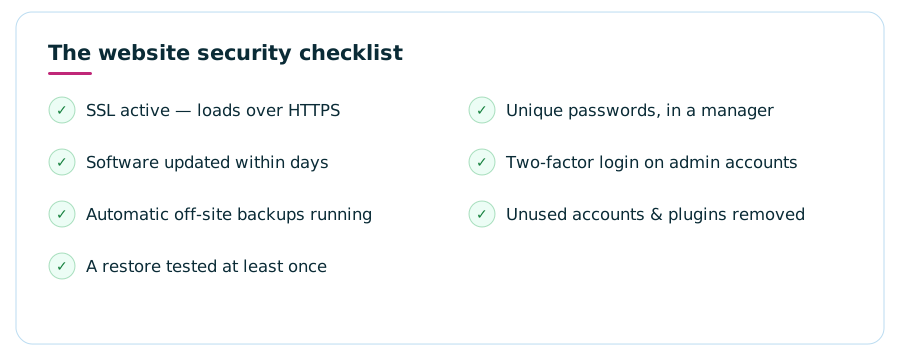
The checklist: seven things a secure small-business site has
Here’s the whole guide compressed into one card. Print it, run it this afternoon, and anything unchecked is your to-do list — or the first thing to hand to whoever maintains your site.
What a hacked website actually costs a small business
The cleanup invoice is the smallest part, and it’s worth walking through the rest — because “we’ll deal with it if it happens” consistently underestimates what “it” is.
Downtime and lost business. While the site is compromised or offline, every visitor who would have called, booked, or bought simply doesn’t — and most never mention it. They hit a warning page or a spam redirect, form a quiet conclusion about your business, and go to a competitor. That revenue never shows up on any invoice, which is exactly why it gets undercounted.
The blacklist problem. Search engines and browsers flag hacked sites to protect users. A flagged site greets visitors with a full-screen red warning — the single most trust-destroying thing a customer can see next to your name — and can be demoted or temporarily pulled from search results. Getting a clean bill of health restored takes a cleanup, a review request, and patience, and your rankings can take months to fully recover from the spam and downtime a hack injects.
Email fallout. If the attacker used your domain to send spam — a favorite use for a hijacked small site — your domain’s reputation goes with it. Suddenly your ordinary quotes and invoices land in customers’ junk folders, and repairing sender reputation is slower and murkier than fixing the site itself.
Trust and data exposure. If customer details passed through the site — even just names and emails from a contact form — a breach can mean awkward disclosure conversations and, depending on where your customers live, legal obligations. Customers forgive an ugly website far more easily than they forgive one that leaked their information.
The emergency premium. All of this arrives at once, urgently, and outside your expertise — the exact conditions under which everything costs the most. Emergency cleanup is priced like the emergency it is, while prevention is priced like a chore. That asymmetry — a modest monthly habit versus a bad month — is the entire business case for taking this guide seriously, and for the maintenance economics covered in our website maintenance cost guide.
Signs your site may already be compromised
Hacks on small sites are usually designed to hide — the longer they run unnoticed, the more value the attacker extracts. Symptoms worth acting on the day you see them:
- Your site redirects some visitors (often mobile, or search-engine traffic) to sites you’ve never heard of.
- Search results for your business show pages, or spammy titles and descriptions, you never wrote.
- Browsers or search results display a warning next to your site’s name.
- The site turns sluggish for no reason, or your host warns about unusual resource usage.
- Admin users you don’t recognize, or files changing when nobody made edits.
- Customers mention your emails are landing in spam.
If you spot one: don’t start deleting things. Change your passwords (site, hosting, domain) from a clean device, take the site’s state into account before restoring — you want a backup from before the compromise — and get someone qualified to find the entry point, or the same bot walks back in next week through the same hole. Speed matters more than blame: the damage compounds daily.
FAQWebsite security — common questions
Do small business websites really get hacked?
Yes — constantly, and almost never because anyone chose them. Attacks are automated: bots scan the web for sites running software with known flaws, weak logins, or missing basics, and break in wherever the probe succeeds. Size and fame are irrelevant to a bot; being an easy target is the only qualification. That’s also the good news — covering the basics removes you from nearly all of the actual threat.
Is SSL enough to keep my website secure?
No. SSL encrypts the connection between your visitor and your site — essential, but it says nothing about whether the site itself is clean. A hacked website serves malware over a perfectly valid padlock. SSL is one of four basics; software updates, off-site backups, and strong login protection are the other three.
How often should I update my website software?
Check at least weekly, and apply security-labeled updates within days — releasing a fix also publishes what was broken, so bots begin probing for the old version almost immediately. Run a backup before updating and click through the site (especially the contact form) afterward, and updates stop being scary.
How often should I back up my website?
Daily for a site that changes often, weekly at minimum for a static brochure site — automatically, stored off your web server, with at least a month of restore points kept. The retention matters because hacks often go unnoticed for weeks; a single recent backup may just be a clean copy of an infected site. And test one restore, once, so you know the backups actually work.
What should I do if my website gets hacked?
Change every related password (site admin, hosting, domain registrar) from a device you trust, then restore from a backup taken before the compromise — and have someone qualified identify how the attacker got in before you consider it fixed. Cleaning the visible damage without closing the entry point just schedules the next hack. If the site was flagged by browsers or search engines, request a review after cleanup.
How do I know if my website is secure right now?
Run the seven-point check: HTTPS loads with a valid padlock, all software is current, automatic off-site backups exist and one restore has been tested, every login has a unique password, admin accounts use two-factor authentication, and there are no leftover accounts or unused plugins. Anything you can’t confidently answer “yes” to — or don’t know how to check — is exactly what a managed support plan is for.